Research and Summarize Web Pages
Highlight any webpage and ask Dume to summarize it, extract key facts, or compare it against other sources — all from your browser.
Starter prompt
Summarize this article in 5 bullet points. Then list any statistics mentioned, and tell me what the author's main argument is.
Introduction
Dume for Chrome adds an AI layer to every webpage you visit. With one click, you can ask Dume to summarize, explain, extract data, or translate any content — without switching tabs or copying text.
Installation
- Install Dume for Chrome from the Chrome Web Store
- Sign in with your Dume account
- Click the Dume icon in your browser toolbar to open the sidebar
Core Capabilities
Summarize any page
Open the Dume sidebar on any article, documentation page, or report and ask:
"Give me the 5 most important takeaways from this page."
Dume reads the full page content and produces a structured summary — even for long-form research papers or lengthy product docs.
Extract structured data
For pages with tables, lists, or repeated data (pricing pages, job boards, specs):
"Extract all the pricing tiers and features from this page as a table."
Dume returns the data in a clean, copy-ready format.
Explain technical content
On documentation or technical articles:
"Explain this in plain English. I'm a product manager, not an engineer."
Compare with another source
With multiple tabs open:
"Compare what this article says about React Server Components with the official Next.js documentation I have open in my other tab."
Research Workflow
A typical research session with Dume for Chrome:
- Open 5–10 tabs of source material
- In each tab, ask Dume to extract the key points
- In a final tab, ask Dume to synthesize everything: "Summarize the common themes across all the research I've shared in this session"
- Save the output to Notion or export as Markdown
Privacy
Dume for Chrome only reads page content when you explicitly activate the sidebar. It does not monitor your browsing in the background. Sensitive pages (banking, private dashboards) can be excluded via the extension settings.
More Dume for Chrome use cases
Other workflows you can automate with Dume for Chrome.
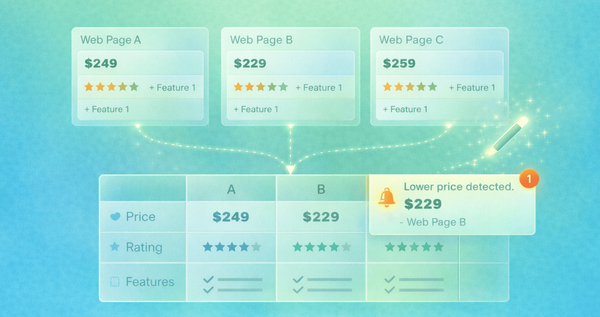
Compare Options Across Websites
Extract and normalize data from multiple pages to generate structured comparisons and make better decisions faster.

Extract Data from Websites
Scrape, structure, and export data from any public webpage directly from your browser without writing a single line of code.

Fill Forms Automatically
Stop re-typing the same information. Dume for Chrome fills web forms using your saved profile data or dynamic context in seconds.