Try Dume.ai on WhatsApp for Smarter AI Messaging

Team Dume.ai
• • 6 min read
All your tools. One intelligent assistant.
Your AI executive assistant that plans, organizes, and acts for you across every tool you use.
Meet your Personal AI assistant on WhatsApp
AI is rapidly moving to the places we already spend our time—and for billions of people worldwide, that place is WhatsApp. Whether you’re messaging friends, coordinating work, or managing your day, WhatsApp is the global hub for communication. Now, thanks to Dume.ai’s powerful new releases, WhatsApp becomes something even better: your AI-powered productivity assistant.
With the latest upgrades from Release 3.8 and Release 3.10, Dume.ai brings voice intelligence, video understanding, image generation, workflow automation, and message delivery directly inside WhatsApp. The result is a seamless, hands-free, mobile-first AI experience that works 24/7—right from your pocket.
This long-form guide will walk you through every feature, how it works, real-world use cases, and why WhatsApp is the smartest place to use Dume.ai today.
Why WhatsApp Is the Future of Mobile-First AI
WhatsApp has crossed 2.8 billion global users, surpassing email and SMS as the world’s most-used communication channel. It’s fast, lightweight, intuitive, and accessible to everyone—from CEOs to students to remote workers.
But until recently, AI assistants required you to open a separate app or web interface. Dume.ai changes that.
Dume.ai on WhatsApp allows you to:
- Talk to your AI assistant just like chatting with anyone else
- Send voice notes instead of typing
- Submit photos or videos for explanations
- Ask for daily briefings, reports, schedules, summaries
- Run tasks and workflows from anywhere
- Use slash commands to control your assistant
- Generate images instantly inside WhatsApp
- Automate WhatsApp messaging through workflows
- Keep conversations synced across devices
No switching apps. No friction. No learning curve.
This is the future of AI—fast, familiar, and accessible directly from WhatsApp.
What Is Dume.ai on WhatsApp?
Dume.ai on WhatsApp is the same powerful executive AI assistant you know from the web—but optimized for mobile, automation, voice, and instant messaging.
You can:
- Ask questions
- Get AI-powered answers
- Manage tasks and deadlines
- Check your schedule
- Summarize emails
- Get briefings
- Generate images
- Trigger workflows
- Receive updates
- And more—without touching the web interface
The WhatsApp integration connects directly to your Dume.ai account, syncing your tasks, workflows, emails, calendars, and preferences.
All WhatsApp Features: Full Breakdown
Below is the complete feature set introduced through Release 3.8 and Release 3.10, now available for all Dume.ai users.
1. Voice Messages → Hands-Free AI Conversations
Voice messages are the biggest quality-of-life improvement for mobile AI users. Instead of typing long prompts, you can simply speak.
What you can do:
- Explain long tasks in a single voice note
- Ask questions with natural speech
- Convert speech into structured tasks
- Request summaries of meetings
- Describe images or problems verbally
Real example:
“Hey Dume, create a task: Follow up with Sarah about the Q1 design revisions. Deadline Friday evening.”
You speak.
Dume.ai understands.
Your assistant creates the task instantly.
Perfect for commuting, multitasking, or on-the-go work.
2. Video Message Understanding
Now you can drop a video into WhatsApp, and Dume.ai will respond with understanding, summaries, instructions, or explanations.
Use cases:
- Show a screen recording and ask:
“What is the error here?” - Record a product demo and ask:
“Summarize this in bullet points.” - Send a tutorial and ask:
“Rewrite the steps clearly.”
AI now analyzes video context directly from WhatsApp.
3. Share Your Location for Contextual Assistance
Location sharing allows Dume.ai to provide real-world, situation-based help.
Examples:
- “Give me a list of nearby cafés where I can work.”
- “Remind me to send this report when I get home.”
- “Tell me the travel time from here to the office.”
This is mobile AI at its smartest.
4. Contact Sharing → CRM, Messaging, and People Insights
When you share a WhatsApp contact, Dume.ai can:
- Create a task related to that person
- Prepare a message template
- Pull context from prior tasks involving that contact
- Help with follow-ups
- Draft reminders
Productivity meets relationship management—without needing a CRM.
5. Native Image Generation Using /generate
This is one of the most impressive upgrades in Release 3.10.
You can now generate AI images directly inside WhatsApp using a simple command:
/generate a futuristic workspace with neon blue lighting
Dume.ai instantly returns images inside WhatsApp—no web app needed.
Use cases:
- Create design ideas quickly
- Generate visuals for presentations
- Brainstorm creative concepts
- Share image drafts with teams
- Do visual planning on the go
A full AI art studio inside your chat window.
6. Slash Commands for Faster Control
Slash commands make Dume.ai feel like a command-line assistant built into WhatsApp.
Current commands:
/generate→ create images/newchat→ reset conversation context
More commands coming soon:
/task/summarize/workflow
Slash commands are faster than typing full prompts and give you total control.
7. Trigger Instant Workflows from WhatsApp
WhatsApp becomes a powerful automation command center.
Examples:
- Start your Morning Briefing workflow:
“Run morning briefing.” - Trigger a custom workflow:
“Run weekly sales insights.” - Activate your personal workflow:
“Run content planning workflow.”
All your automations are now accessible from your mobile device.
8. Send WhatsApp Messages FROM Workflows
This is a game-changing automation tool.
Your workflows can now send outbound WhatsApp messages automatically.
Examples:
- Send reminders to yourself
- Send automated alerts to your team
- Notify clients instantly when documents are ready
- Send custom messages triggered by conditions
Dume.ai becomes your personal messaging automation engine.
9. Messaging Dashboard → Send WhatsApp Messages From Web
You can also send WhatsApp messages directly from your Dume.ai dashboard.
Useful for:
- Team updates
- Quick notifications
- Client follow-ups
- Automated reports
No switching apps. The assistant handles everything.
10. Better Media Handling for a Faster Experience
Release 3.10 improved the entire media pipeline:
- Faster uploads
- Smooth processing of voice & video
- More accurate audio transcription
- Reduced errors when sending large files
- Improved image reception
Everything in WhatsApp now works faster, smoother, and more reliably.
11. Context Sync Across Web & WhatsApp
If you start a conversation on WhatsApp and switch to the web:
- Your context is synced
- Your tasks sync
- Your workflows sync
- Your assistant remembers the conversation
You get a consistent AI experience across devices.
12. Full Assistant Capabilities Inside WhatsApp
The WhatsApp integration includes nearly all assistant features:
Ask Questions & Get Answers
- Research
- Explanations
- Summaries
- Recommendations
Task Management
- Create tasks
- Set deadlines
- Get status updates
- Manage your workload
Email & Calendar
- Email summaries
- Triage
- Important message alerts
- Schedule checks
- Meeting invites
Quick Workflows
- Morning briefings
- Daily summaries
- Notifications
- Automation triggers
All with just a text or voice message.
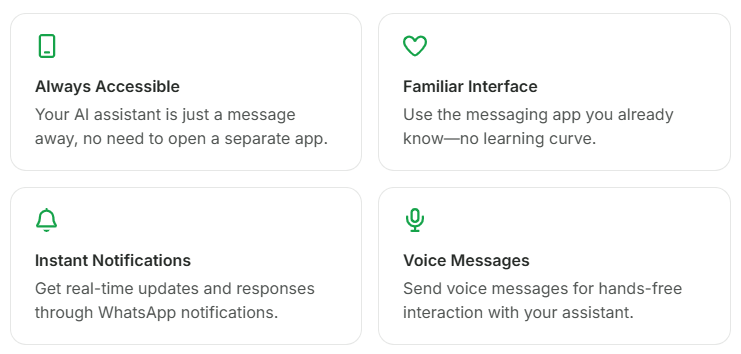
Why Use Whatsapp?
How to Set Up Dume.ai on WhatsApp (Quick Guide)
- Log in to your Dume.ai account
- Go to Integrations → WhatsApp
- Click “Message us on WhatsApp”
- WhatsApp will open
- Send any message (e.g., “Hi”)
- Dume.ai will send your secure linking link
- Tap the link to connect
- You’re ready to chat with your AI assistant anytime
Setup takes less than 30 seconds.
Want more details?
Check out the full guide here: Complete WhatsApp Integration Guide
WhatsApp vs Web App When to Use Each
| Task | Web | |
|---|---|---|
| Quick questions | ✅ | — |
| Voice or video messages | ✅ | — |
| Running workflows | ✅ | — |
| Creating workflows | — | ✅ |
| Managing integrations | — | ✅ |
| Daily briefings & updates | ✅ | — |
| Deep work or long tasks | — | ✅ |
| Full dashboard & analytics | — | ✅ |
| Mobile use | ✅ | — |
Both together give you the best AI experience.
Privacy & Security
Dume.ai’s WhatsApp integration follows strict security standards:
End-to-End Encryption
Your conversations remain private through WhatsApp’s encryption.
OAuth Secure Authentication
Linking your account uses safe authentication flows.
No Message Storage
Dume.ai does NOT store your WhatsApp messages.
Disconnect Anytime
You can unlink WhatsApp from the dashboard instantly.
Ready to experience the smartest AI assistant right inside the world’s most-used messaging app?
With voice understanding, video processing, image generation, workflows, slash commands, and end-to-end encrypted conversations—Dume.ai on WhatsApp becomes your ultimate mobile productivity companion.
👉 Start using Dume.ai on WhatsApp today and transform the way you work, communicate, and stay organized.
FAQs
All your tools. One intelligent assistant.
Your AI executive assistant that plans, organizes, and acts for you across every tool you use.