
How to Control Your Desktop AI from WhatsApp (Complete Guide 2026)

Team Dume.ai
• • 9 min read
Meet Dume Cowork
A desktop AI agent that handles files, browser research, and reports end-to-end.
Picture this: you're at lunch, twenty minutes away from your desk, and a client emails asking for a formatted expense summary from last month's receipts. The files are sitting in a folder on your computer. Two years ago, your only option was to rush back to your desk or apologize for a delay. Today, you pull out your phone, send a WhatsApp message, and by the time you finish your coffee the finished spreadsheet has arrived back in the same chat.
That's exactly what Dume Cowork's WhatsApp integration makes possible. And it works in ways most people don't expect.
Key Takeaways
- 52% of the global workforce is now hybrid or remote, spending large portions of the workday away from their primary computer (Chanty, 2026).
- Dume Cowork accepts tasks via WhatsApp as text messages, voice notes, photos of documents, and file attachments — and sends finished work back in the same chat.
- Setup takes one step: add Dume's WhatsApp contact and start messaging.
- No competitor currently offers full desktop file control through WhatsApp — this is a capability gap other tools haven't closed.
What is a Desktop AI Agent? The Definitive Guide
What Does "WhatsApp Desktop AI Control" Actually Mean?
WhatsApp is already used for work communication by an estimated 1.6 billion people every month (DemandSage, 2026). WhatsApp desktop AI control means using that same app — already on your phone — as a complete interface for directing an AI agent running on your Mac or Windows computer, with no separate app or dashboard required.
You don't need to open a separate app, log into a dashboard, or be anywhere near your desk. You send a message. The agent gets to work on your computer. You get results back — and with Dume Cowork, that means full parity with the desktop app: file organization, spreadsheets, reports, document analysis — all from a chat you're already in dozens of times a day.
According to a 2025 Jobera survey, 77% of employees already use smartphones for work tasks, a figure projected to reach 91% by 2027 (Jobera, 2025). The question isn't whether people want to work from their phones — they're already doing it. The question is whether their tools are actually built for it.
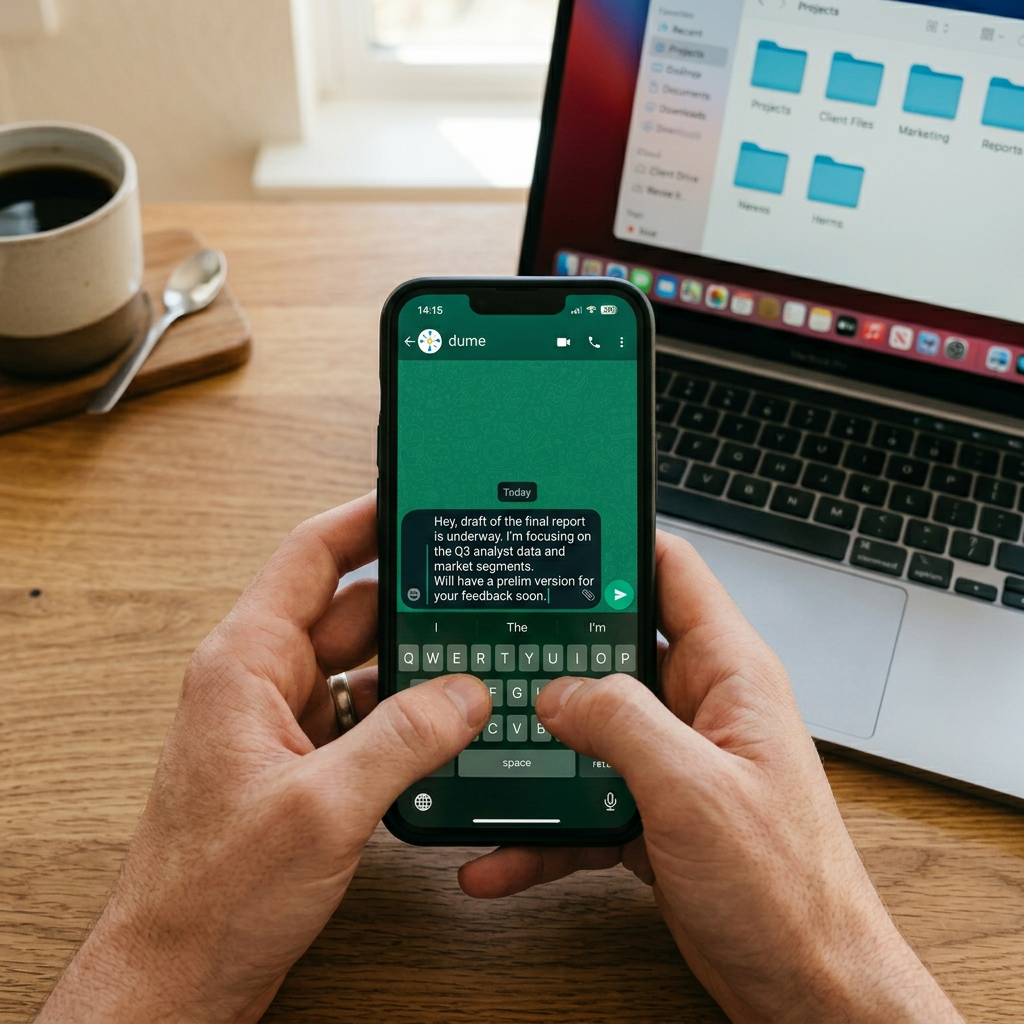
How to Set It Up: One Step
Most explanations of "AI you can control remotely" involve OAuth flows, API keys, third-party app installs, or mobile apps that need their own onboarding. The Dume Cowork WhatsApp setup is different in a way that's almost anticlimactic once you've done it.
The entire setup is one step: add Dume's WhatsApp contact to your phone and start messaging.
That's it. No scanning a QR code into a separate system. No authentication beyond your existing WhatsApp account. No dashboard configuration. You message Dume the same way you'd message a colleague, and the conversation begins.
Dume Cowork uses a dedicated number — you add it as a contact, and from that point your WhatsApp chat with Dume is your command interface. There's no app switching, no context-switching, no additional login. If you can send a WhatsApp message, you can run your desktop AI agent.
Dume Cowork's WhatsApp integration gives knowledge workers a full-featured AI agent interface inside the messaging app they already use daily. With 3.14 billion WhatsApp monthly active users globally — including an estimated 1.6 billion using it for work communication (DemandSage, 2026) — the integration removes the only remaining friction between a user and their AI: having to be at a computer.
What You Can Send: More Than You'd Expect
83% of workers already feel obligated to respond to work communications outside office hours (Tech.co, 2025) — and most of that happens from a phone. Dume Cowork's WhatsApp interface is built for exactly those moments, accepting four types of input that cover virtually any task you'd want to hand off. This isn't text-only.
Text Instructions
The obvious one. Type a task the same way you'd describe it to a colleague: "Organize the files in my Downloads folder by type and rename them with today's date" or "Build me a spreadsheet from the invoices in the April folder." Natural language, no special syntax, no command structure to learn.
Voice Notes
You can send a voice note and Dume will transcribe and act on it. This matters more than it sounds — on a phone, typing out a detailed multi-step task is awkward and slow. Speaking it is natural. You might say: "Hey, I need you to pull the action items from the meeting notes I saved yesterday, put them in a table with owner and deadline columns, and save it to the shared folder." Done in eight seconds of speaking. Dume handles the interpretation.
Photos of Documents
Point your phone camera at a physical document — a printed receipt, a handwritten invoice, a form that was left on your desk — photograph it, and send the image. Dume reads it and works with the content. The photo-to-expense-report pipeline is one of the more immediately practical examples: photograph a stack of receipts at the end of a work trip, send them to Dume, and receive a formatted expense spreadsheet while you're still at the airport.
File Attachments
Send a PDF, Word document, spreadsheet, or any supported file type directly via WhatsApp and give Dume instructions to work with it. You're effectively handing Dume a file the same way you'd hand a document to a colleague in a message.
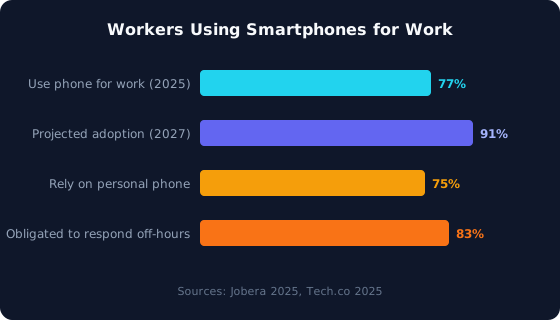
Most workers are already on their phones for work — and most feel pressure to respond off-hours. Source: Jobera, 2025; Tech.co, 2025
What Comes Back: Full Two-Way Conversation
Top productive workers — the 10% who get the most done — spend roughly 2 hours away from their primary workstation each day (Study Finds, 2024). If your AI agent only reports back when you're sitting in front of your computer, you've lost the point. Dume Cowork's WhatsApp interface is fully two-way, delivering confirmations, updates, and finished files back to the same chat you used to send the task.
When you send a task, Dume acknowledges it and confirms what it's going to do. As it works, it sends updates if the task involves multiple stages. When it's done, it replies in WhatsApp with the results — and if the result is a file, it sends that file directly to the chat.
The expense spreadsheet you asked for comes back in WhatsApp. The sorted file list comes back in WhatsApp. The report you asked Dume to prepare arrives as an attachment in the same conversation thread.
This means the entire workflow — instruction, processing, delivery — happens in one chat, on your phone, without touching your computer. For straightforward tasks, you might never open the desktop app at all.
If Dume hits something ambiguous mid-task, it asks in WhatsApp rather than stalling or guessing. You clarify, it continues. It's the same approval-first approach as the desktop app, just in a different interface.
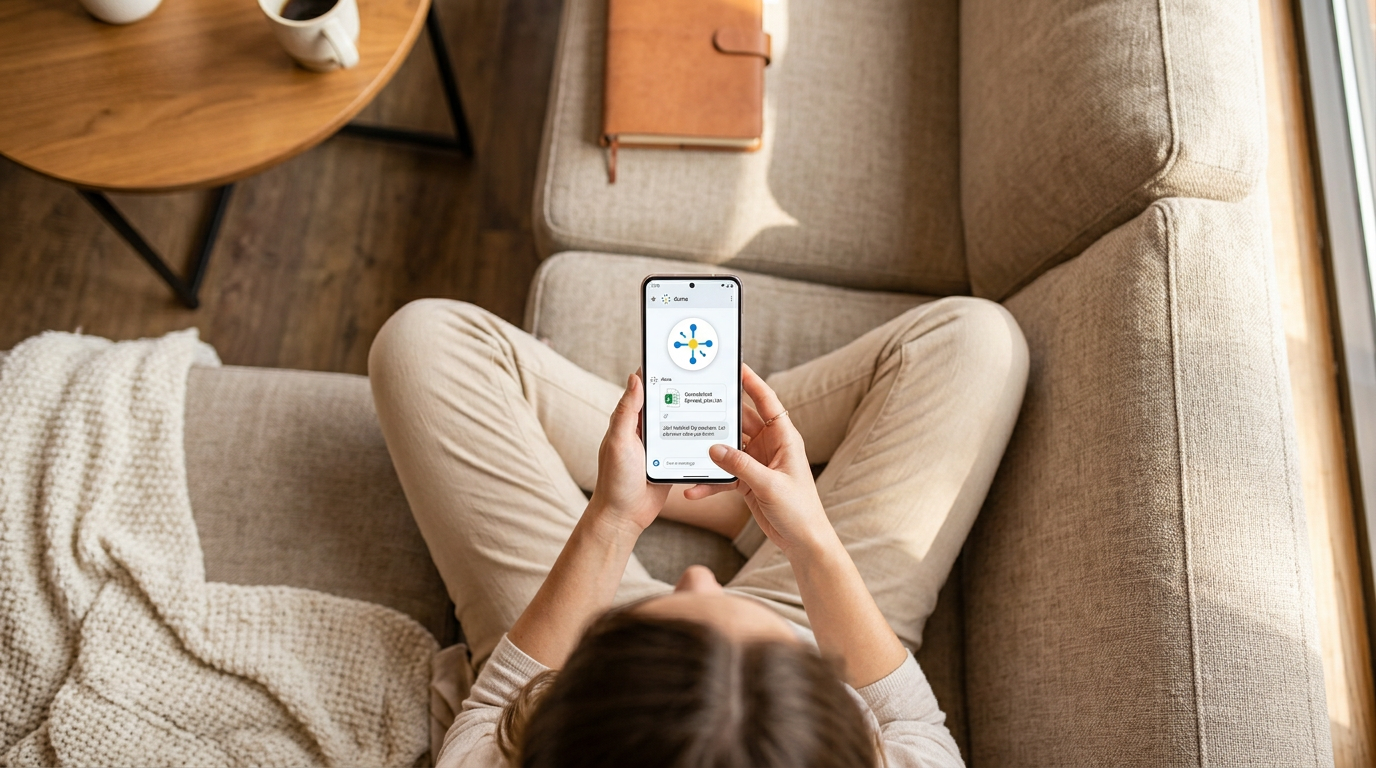
5 Situations Where WhatsApp AI Control Changes the Day
Understanding the mechanics is one thing. Here's where the WhatsApp interface makes a concrete difference — the specific moments that otherwise create friction.
1. You're Away from Your Desk and a Task Can't Wait
52% of the global workforce is now hybrid or remote, according to Chanty's 2026 workforce data (Chanty, 2026). Even fully office-based workers spend significant time in meetings, at lunch, or in transit — none of which are desk time. A task that arrives while you're away doesn't have to wait. Send Dume the instruction from wherever you are and let it run while you're still in the meeting room.
2. You Have a Receipt or Physical Document to Process
Photograph a receipt, a business card with handwritten notes, or a printed form your client left on your desk. Send the photo to Dume with an instruction. It reads the image, extracts the relevant information, and uses it in whatever task you've described. No scanning equipment, no OCR app — just your phone camera and a WhatsApp message.
3. You Think of Something on the Commute
Good thinking doesn't happen only at your desk. A commute, a walk, a waiting room — these are when background processing kicks in and you remember what you needed to sort out. Instead of adding it to a notes app and hoping you remember when you're back, voice note it to Dume and let it handle it in real time while your computer sits at home or in the office.
4. You're Coordinating with Someone Else via Phone
You're on a call or in a WhatsApp conversation with a colleague and something comes out of it that needs doing. Rather than making a note to do it later at your desk, drop a message to Dume in the same phone session. The task gets done in the time between that conversation and your next one.
5. You Want to Check In Without Opening Your Computer
End-of-day from a café or before you properly start work in the morning: send Dume a quick status message to get a summary of what was completed, or kick off a task you want done by the time you sit down. It's the AI equivalent of delegating something before you leave the office and walking in to find it finished.
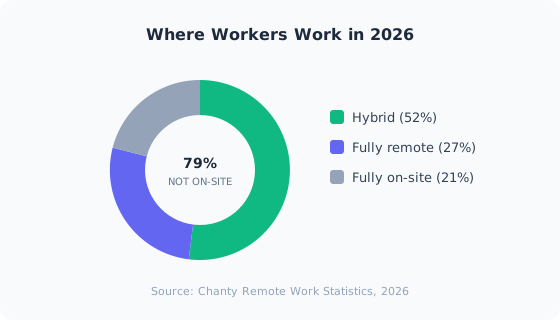
79% of the global workforce now works outside a traditional full-time office setting. Source: Chanty, 2026
How This Differs from Other "AI on Your Phone" Tools
40% of enterprise software applications will embed AI agent capabilities by 2026, up from under 5% in 2025 (Gartner, 2025). That rapid growth means the market is filling with tools that look similar from the outside. It's worth being precise about what makes local WhatsApp desktop AI control different — because the category is getting noisy and the differences are real.
Most tools marketed as "AI you can control from your phone" are one of three things: a mobile app with reduced functionality compared to the desktop version, a WhatsApp customer service bot for answering questions, or an AI assistant that connects to cloud services like your calendar and email but doesn't touch local files.
Martin AI, for instance, is a capable AI assistant that supports WhatsApp and handles scheduling, email drafting, and reminders across messaging channels. It's useful for communication tasks. But it doesn't have access to local files on your computer — it can't pick up the invoices sitting in your Downloads folder and build a spreadsheet from them.
That's the meaningful distinction: Dume Cowork's WhatsApp interface controls a desktop agent that has real, direct access to your local file system. The task execution is happening on your actual computer, with your actual files, and the result comes back to your phone. No files are uploaded to a third-party cloud to be processed — they stay on your machine throughout.
That combination mobile interface, local file execution, results delivered back to the phone has no direct equivalent in the current market. See how Dume Cowork compares.
What You Need for It to Work
Being clear about requirements is more useful than overselling, so here's what the WhatsApp control feature actually needs:
The Dume Cowork desktop app must be running. The WhatsApp interface sends instructions to the agent running on your computer. If the computer is off or the app is closed, there's no agent to receive the task. In practice, most people leave their computer on and the app running when they leave the desk — which is the normal scenario for working from a phone while out.
An internet connection on both ends. Your phone needs to be able to send WhatsApp messages, and your computer needs internet to receive and process instructions. Standard requirement for any cloud-connected workflow.
WhatsApp installed. You need the standard WhatsApp app (not WhatsApp Business required — the regular personal app works).
That's the complete list. No subscription to a separate service, no API credentials, no IT department involvement.
Start Using It
Dume Cowork is available for Mac and Windows and is currently in Research Preview — fully functional with lifetime pricing available to early users.
Start for Free — No Card Required →
No credit card required. Works on Mac and Windows. Early access pricing locked in for life.
Frequently Asked Questions
Conclusion
The promise of AI that handles your work has always been undermined by the same assumption: that you need to be at your computer to use it. Dume Cowork's WhatsApp integration is a direct answer to that assumption.
83% of workers feel obligated to respond to work communications outside office hours (Tech.co, 2025). Most of them are doing it from a phone. If the AI handling your file work can live in the same interface as every other message you're already managing, the only thing that changes is how much of the busywork actually gets done — and when.
Point Dume at the work. Walk away. Come back to it done.
Dume Cowork — pricing and plans
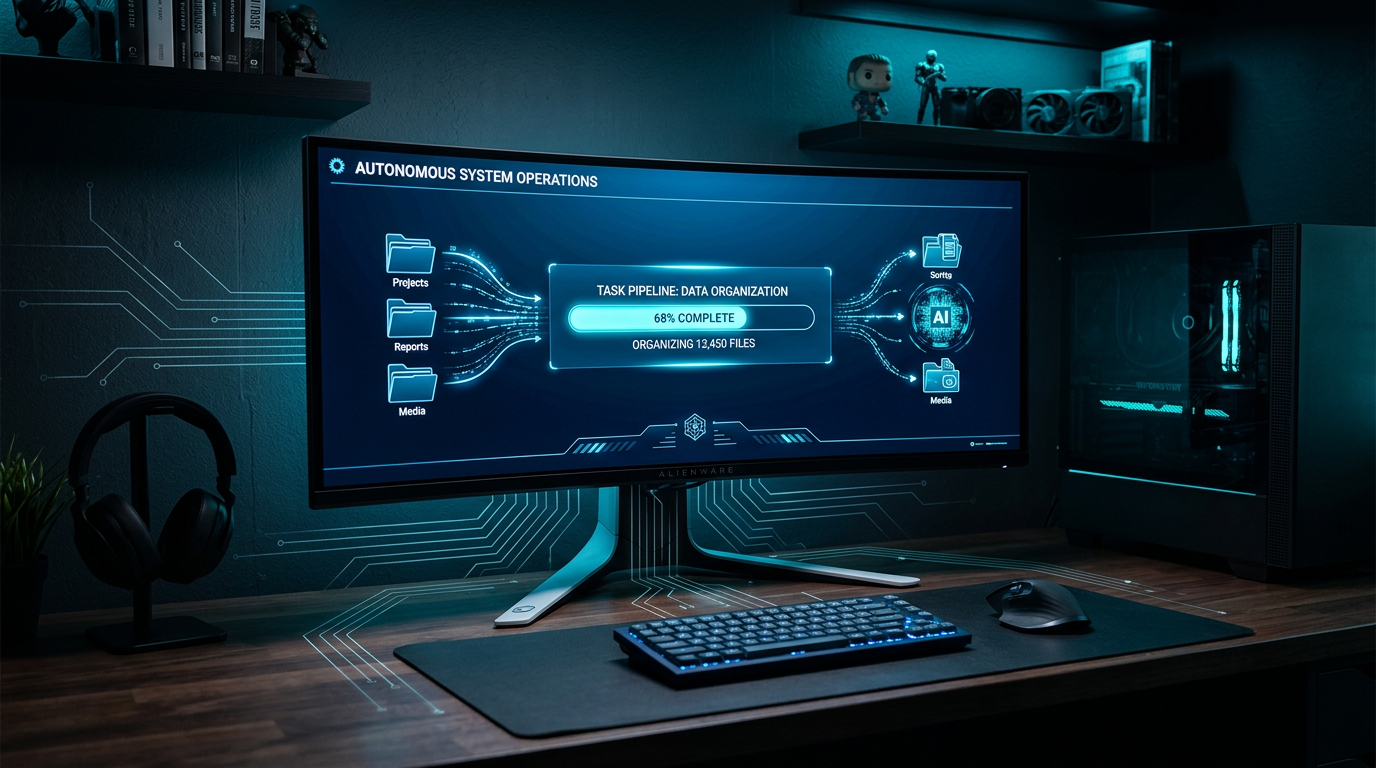
A desktop AI agent runs locally on your Mac or PC, completing file work and research end-to-end. Learn what they are, how they work, and how to choose one.
Meet Dume Cowork
A desktop AI agent that handles files, browser research, and reports end-to-end.