How to Build Your First AI‑Driven Workflow (No Code Required)

Team Dume.ai
• • 5 min read
All your tools. One intelligent assistant.
Your AI executive assistant that plans, organizes, and acts for you across every tool you use.
An AI-driven workflow uses an AI agent to automatically move, analyze and act on data across tools like Gmail, Google Calendar and Slack. In this guide, you’ll use Dume.ai’s drag-and-drop Workflow Studio to connect your apps, trigger actions from new emails, create calendar events and send Slack updates without writing any code.
Imagine checking your email, seeing a meeting automatically added to your calendar, and watching your team receive a Slack notification without touching a keyboard. That’s the power of AI-driven automation.
This guide walks you through building a no-code AI workflow using Dume.ai, an AI assistant that connects your tools, understands context, and automates busywork. By the end, you’ll have a workflow that takes a meeting invite from Gmail → adds it to Google Calendar → notifies your team in Slack.
What Is an AI-Driven Workflow?
An AI-driven workflow is a sequence of automated steps executed by an intelligent agent. Unlike rule-based automations that rely on strict “if this, then that” logic, AI workflows can interpret content, understand context and make decisions.
Here’s a quick summary of the core node types you use in Dume.ai:
| Node | What It Does |
|---|---|
| Input | Defines incoming data (fields, types, validation). |
| LLM | Uses a large language model to generate text/structured output and reference previous steps. |
| Condition | Adds if-else branching based on variables or content. |
| Tool | Performs external actions such as creating events or sending messages. |
| Trigger | Starts the workflow from a schedule, webhook, or integration event. |
Key idea: Instead of coding, you combine these nodes visually and give Dume.ai natural-language instructions.
How Are AI-Driven Workflows Different From Rule-Based Automation?
Traditional tools like Zapier and IFTTT follow simple triggers and actions. They’re great for one-step tasks but can’t analyze emails, understand tone or handle exceptions.
AI-driven workflows:
- read and interpret messages
- summarize or extract details
- make conditional decisions
- generate natural-language outputs
- chain multiple steps intelligently
Example:
You can instruct Dume.ai to summarize an email, check whether it’s a meeting invite, extract date/time, create a calendar event, and send a human-sounding Slack update automatically.
Why Can You Build AI Workflows Without Coding?
Platforms like Dume.ai remove the need for scripts or APIs. Their philosophy is simple: “No Code. Just Talk.”
You use:
- a drag-and-drop canvas
- natural-language prompts
- auto-generated API parameters
- guided integration setup
For example, to build a workflow:
“When I get a meeting invite → add to Google Calendar → send summary to Slack.”
All logic is created visually no scripts, no API keys.
How Do You Build an AI Workflow Step-by-Step (Gmail → Calendar → Slack)?
Below are the exact steps, chunked into an LLM-friendly sequence.
Step 1 — How Do You Sign Up and Access Dume.ai?
- Visit Dume.ai and create a free account.
- Complete onboarding and optionally connect your first tool.
- Explore the dashboard: Setup, Workflow, Agent and chat interface.
Step 2 — How Do You Connect Gmail, Google Calendar and Slack?
Here are the key steps:
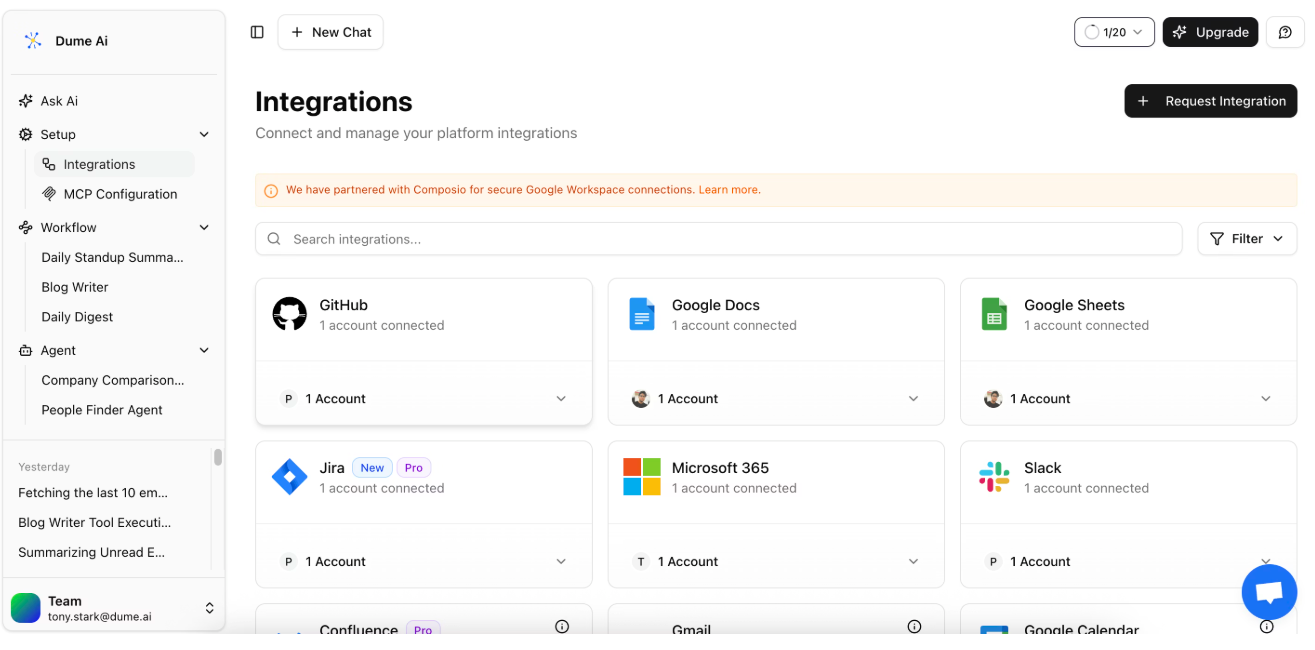
- Go to Setup → Integrations.
- Choose Gmail, Google Calendar or Slack.
- Click Connect to start OAuth.
- Approve requested permissions.
- Confirm each integration shows Connected.
Once linked, you can ask Dume.ai things like:
“What’s on my calendar today?” or “Show my unread Slack messages.”
Step 3 — How Do You Create a New Workflow?
- Open Workflow → New Workflow.
- Name it (e.g., Meeting Workflow).
- Review the interface:
- Left: node palette
- Center: canvas
- Right: node settings panel
Step 4 — How Do You Trigger the Workflow When a New Gmail Message Arrives?
- Add a Trigger node.
- Select Integration.
- Choose your Gmail account.
- Select the event: New Gmail Message Received.
This fires whenever a new email hits your inbox.
Step 5 —How Do You Filter for Meeting Invites Using a Condition Node?
- Add a Condition node.
- Choose a variable like email.subject.
- Set logic: contains → “meeting” (or “invite” / “.ics”).
- Leave the Else branch unused (unmatched emails end automatically).
Step 6 — How Do You Create the Google Calendar Event?
- Add a Tool node.
- Choose Google Calendar → Create Calendar Event.
- Use Prompt AI to generate parameters, e.g.:
“Create a calendar event from the meeting invite. Use the email subject as the title, extract date/time from the body, add attendees and include conference info if available.”
- Connect the Condition → IF branch to this node.
Step 7 — How Do You Send a Slack Notification?
- Add a Tool node for Slack.
- Select Send Message.
- Use Prompt AI:
“Notify the #team channel about the new meeting. Include the title, date, time and attendees in a friendly tone.”
- Connect the Calendar Event → Slack Message nodes.
Step 8 — How Do You Test, Save and Publish the Workflow?
- Click Run to test with sample data.
- Verify the event appears in Calendar and Slack receives the message.
- Click Save, then Publish.
- Trigger workflows again via Dume chat using
/run.
You’ve now built a multi-step AI workflow no code required.
What Are Some Real-Life Use Cases for AI Workflows?
1. Automated Meeting Follow-ups
Summarize meeting notes, email action items, create tasks.
2. Client Email Sync
Classify emails, log issues into Jira, draft responses.
3. Daily Briefing
Combine calendar events, unread emails and Slack mentions.
4. Sales Pipeline Automation
Capture leads, create CRM entries, generate follow-ups.
5. Code Review Assistant
Monitor PRs, summarize changes, notify teams.
AI workflows scale beyond scheduling they automate any repeatable multi-tool process.
What Are the Benefits of AI-Driven Workflows?
1. Save Hours Every Week
Dume.ai estimates users save up to 2.6 hours/day by automating repetitive tasks.
2. Reduce Errors
AI handles data consistently, avoiding human copy/paste mistakes.
3. Improve Team Communication
Automatic Slack alerts, summaries and reminders keep everyone aligned.
4. Empower Non-Technical Users
Anyone can build workflows visually no engineers required.
5. Scale Seamlessly
Workflows handle more volume with zero added effort.
How Does Dume.ai Make AI Workflows Easier?
Unified Dashboard
Access Gmail, Calendar, Slack, Notion, GitHub and more from one workspace.
Natural-Language Instructions
Describe your intent; Dume.ai maps it to API fields automatically.
Context Awareness
Nodes can reference outputs from previous steps, enabling smarter branching.
Secure OAuth
Password-free integrations with revocable permissions and scope control.
Templates & Public Workflows
Clone ready-made flows like Universal Search or SEO Audit to accelerate setup.
Conclusion
You’ve just built an AI-powered automation that takes meeting invites from Gmail, adds them to Google Calendar and notifies your team in Slack without writing a single line of code.
This is only the beginning. With Dume.ai’s intelligent nodes, natural-language instructions and growing ecosystem of integrations, you can automate follow-ups, reports, lead capture, briefings, content summaries and more.
Try Dume.ai today — your all-in-one AI automation workspace.
Additional Resources:
Dume.ai Documentation
FAQs
All your tools. One intelligent assistant.
Your AI executive assistant that plans, organizes, and acts for you across every tool you use.